Access and Share via Samba Protocol
1. Click on "LAN Share" on the homepage, select "Samba", and enter the settings interface. Click on "Account Password" to set up.

2. In the pop-up window, you can click on "Auto Generate" at the bottom left to generate an account based on the username, or set it up manually, then click on "Create" at the bottom right to complete the account creation.

3. After creating the account, the main account and public space access are automatically enabled by default, while personal space needs to be manually enabled. You can also click on "One-click Mount" to mount the storage path to your computer.


FTP (File Transfer Protocol) is a standard network protocol used for transferring computer files between a client and a server over a computer network.
- File: Refers to any type of data, such as documents, images, music, videos, software, etc.
- Transfer: Refers to uploading and downloading
- Upload: Sending files from your computer to a server.
- Download: Retrieving files from a server to your computer.
- Protocol: A set of predefined rules and standards.
The FTP protocol is simple, fast, and efficient, making it widely used for file sharing and transfers.
How to Enable FTP Transfer Protocol in CyberData App? (Windows)
Log in to go to the homepage on CyberData App, locate and click "LAN Share" → "FTP" → "+", to add the folder path you wish to share.

Find the folder you want to share, click on it, and then "Select Current Directory Files" in the lower-right corner.


The shared folder directory will be successfully created. Click on it to view:
- Server Address
- Shared Folder Path
- Username
- Password


How to Access a Shared Folder on a NAS in a Local Area Network via FTP?
1. First, we need to confirm that the Windows computer and the NAS are on the same local area network.
2. Press Win + E to open Windows File Explorer.
3. In the address bar, enter ftp://<NAS_IP_address>, then press Enter. For example: ftp://192.168.8.30
4. You will be prompted to enter a username and password. Input your NAS device account credentials and click "Log in".


How to Start the FTP Transfer Protocol in CyberData App? (Mac)
Log in to go to the homepage on CyberData App, locate and click "LAN Share" → "FTP" → "+", to add the folder path you wish to share.

Find the folder you want to share, click on it, and then select "Choose Current Directory" in the lower-right corner.

The shared folder directory will be successfully created. Click on it to view:
- Server Address
- Shared Folder Path
- Username
- Password


How to Access Shared Folders on a NAS in a Local Network via FTP?
Since using the native Mac connection may result in the data not being recognized, we recommend that customers use the FileZilla client software.
(FileZilla is a free and open-source FTP tool primarily used for fast and stable uploading, downloading, and managing files between a local computer and a server.)
You can download the FileZilla software via your browser at: https://filezilla-project.org
Download Steps:


1. Ensure that both Windows and the NAS are on the same local network.
2. Open an FTP client (the following example uses FileZilla for demonstration).
3. Enter the NAS username and password.
4. Enter the port number used by the NAS for the FTP service. If no port number is specified, the default port for the FTP service is 21. Then click the "Quickconnect" option.

5. Click "Quickconnect" to log in to the NAS. Once logged in, you will be able to view the shared folder structure on the NAS and perform file uploads, downloads, or management operations.

Please note: The default port number for the FTP service is 21.
Transferring via NFS Protocol
NFS (Network File System) is a network file system protocol based on TCP/IP transmission. Through the NFS protocol, clients can access shared resources on remote servers as if they were accessing local directories. Below are detailed steps on how to configure and use NFS in Cyber Cloud.
How to Work
1. Enable the NFS Client
(1) Press Win + R to open the "Run" dialog, type "control," and press Enter to open Control Panel.
(2) In Control Panel, select 【Programs > Programs and Features】.
(3) Click "Turn Windows features on or off" on the left.
(4) In the pop-up window, locate and check "NFS Services," then click "OK."

Log in to go to the homepage on CyberData App, locate and click "LAN Share" → "NSF" → "+". Click "Select Current Directory" in the lower right corner (Note: Only one folder can be selected at a time).


4. Click "Close Sharing", and when the "Disabled Successful" prompt appears, the file sharing will be canceled.


5. Mount via Command Line (Currently only command line mounting is supported; one-click mounting software is under verification. Please stay tuned for version updates.)
(1) Press Win + R, type cmd to open Command Prompt, and then press Enter.
(2) In the Command Prompt, enter the following command to create a mount point (e.g., Y:). Refer to the format: “mount -o anon” + one-click copy address + mount point. For example: “mount -o anon \192.168.8.30\3122D37D\Music Y:”.


(3) After successful mounting, you can access the shared folder through the mount point (e.g., Y:) in File Explorer.

(4) If you need to mount other folders, you must first disconnect the already mounted folder and then remount it (right-click the mounted folder and select "Disconnect").
Causes and Solutions for NFS Protocol Mount Failures
1. Mount Failure or Permission Error:
(1) Verify that the NFS service and shared directory permissions are correctly configured. You can try restarting the NFS service.
(2) Ensure that the IP address of the computer attempting to mount via NFS is included in the permission list of the NFS rules for the shared directory.
2. Network Connection Issue:
Check whether the network connection is normal and confirm that the Windows computer and the NAS device are on the same network.
3. Firewall Configuration:
Review the firewall rules on the client computer. Ensure that the firewall allows NFS protocol traffic, including the NFS port (default is 2049). If you are uncertain about the firewall configuration, you can temporarily disable the firewall to test whether normal access is possible.
4. Mounted NFS Shared Folder Name Appears as Garbled Characters:
Go to the Windows computer's Control Panel > Clock and Region > Region Settings, and enable "Use Unicode UTF-8 for worldwide language support".

4. Access via FTP
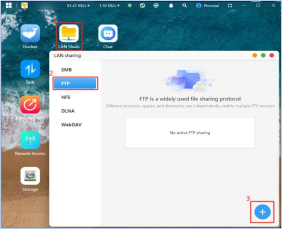
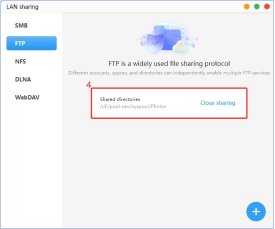
· Click on "LAN Sharing" on the homepage, select "FTP", and enter the settings interface. Click on the "+" at the bottom right to set up. · After selecting the folder to be shared on CyberData, a success message will be prompted.
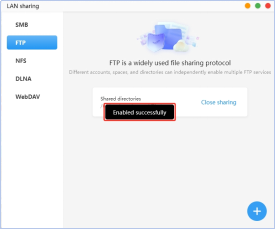
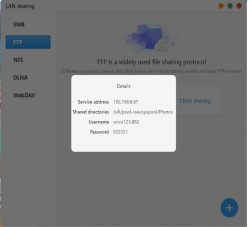
· After enabling FTP, click on the shared directory, and the shared service address and other information will pop up.
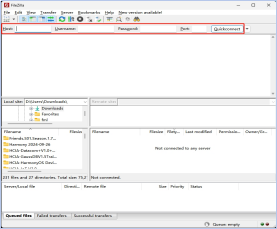
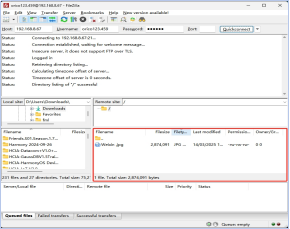
· It is recommended to use FileZilla software to connect. After entering the account password, click on "Quick Connect" to complete the login.
Apple TimeMachine Setup
1. Click on "More Applications" on the homepage, select "TimeMachine", and enter the settings interface to enable.

2. Enable the Time Machine function and activate this account. After enabling, a "Enabled successfully" prompt will appear. Click "View account password" to view the service address, username, and password information.


3. Go to your Mac, click "System Settings → General → Time Machine".

4. Then open the "Time Machine" application on your Mac, and click on "Add Backup Disk". In the pop-up, select the NAS backup space and confirm.

5. Select the device that needs to be backed up within this local network and click "Set up disk".

6. Enter the account and password for "TimeMachine", then click "Connect".

7. After a successful connection, there will be a prompt with the option to enable encrypted backup.
Note: This feature is the encryption function for macOS Time Machine data storage. If selected, the data will be encrypted and cannot be accessed or used without a password. If no password is set, anyone with access to the hard drive can read the data.

8. After successful setup, TimeMachine will automatically back up data from the Mac.

2. Access via DLNA
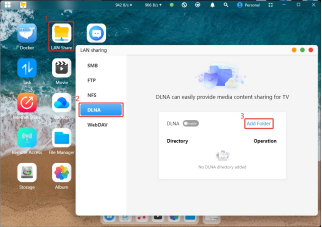
· Click on "LAN Sharing" on the homepage, select "DLNA", and enter the settings interface. Click on "Add Directory" to set up. As shown in the bottom left image.
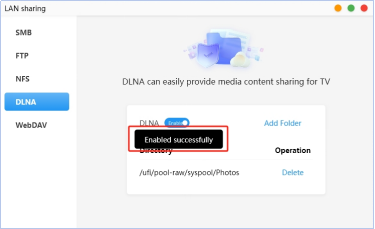
· After selecting the folder to be shared on CyberData, a “Enabled Successfully” message will be prompted, and the DLNA switch will also be automatically turned on, allowing you to access CyberData files on your TV via the DLNA protocol.